 Try ShortPoint now
We understand that organizational timelines often do not align with global update schedules. If you need a bit more breathing room beyond the March 1st deadline for the Content Security Policy (CSP) update, Microsoft has provided a way to implement a 90-day extension. You can use this to ensure that you can complete any necessary preparations on your SharePoint environment, including your ShortPoint update, with confidence.
By running a quick PowerShell command, you can officially push your enforcement deadline by 90 days, until June 1, 2026. This gives you an extra three months to verify that your intranet sites continue to work just fine without the risk of immediate interruptions.
Important:
This postponement option will be available in the SharePoint Online Management Shell starting February 9, 2026.
TABLE OF CONTENTS
Prerequisites
- You will need Global Admin or SharePoint Admin permissions to implement these changes. If you do not have administrative rights, please forward this guide to your IT department or SharePoint Administrator so they can perform the postponement for you.
- You need the latest version of the SharePoint Online Management Shell installed on your computer.
Using PowerShell to Postpone CSP Enforcement: Step-by-step Guide
Follow these steps to delay CSP Enforcement on your SharePoint sites:
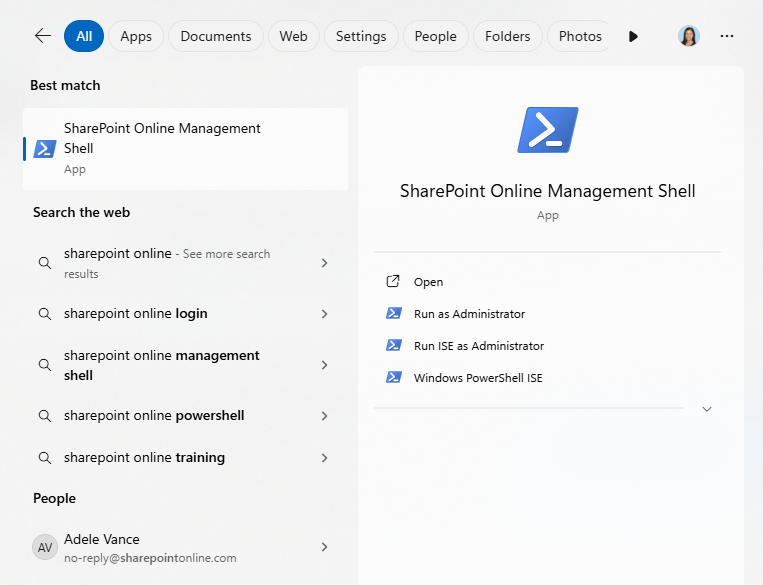
Step 1: Open SharePoint Online Management Shell
- On your computer, search for SharePoint Online Management Shell
- Run it as an Administrator
Step 2: Connect to your SharePoint Tenancy
- Copy and input this command line, replacing
[your-tenant]with your organization's tenancy name:
Connect-SPOService -Url https://[your-tenant]-admin.sharepoint.com
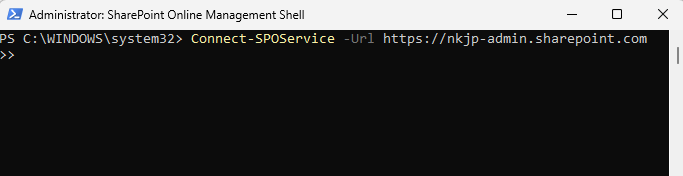
- Enter your credentials
Step 3: Run PowerShell Command
- Once you are connected, copy this command line and click Enter:
Set-SPOTenant -DelayContentSecurityPolicyEnforcement $true
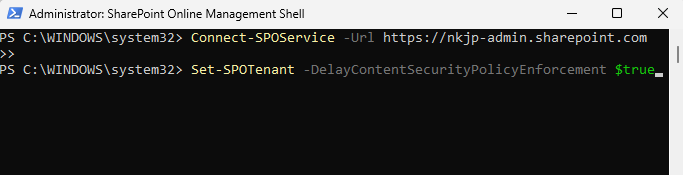
That is it! You have successfully delayed the CSP enforcement by 90 days. Remember that postponements can only be set through June 1, 2026.
We’re Here to Help
If you run into any concerns while running these commands or have questions about what this extension means for your ShortPoint designs, our team is ready to assist. Reach out to us at support@shortpoint.com any time.
Related articles:
- Content Security Policy (CSP) in SharePoint Online: What It Is and Why It Matters
- Quick Guide to Ensuring ShortPoint Compatibility with Microsoft’s Content Security Policy (CSP)
- Managing Trusted Script Sources for JavaScript Customizations in ShortPoint
