 Try ShortPoint now
Microsoft is introducing a stricter Content Security Policy (CSP) to enhance security across SharePoint. The good news? ShortPoint is already fully compatible. To ensure your intranet pages continue to display perfectly without any interruptions, we need just a few minutes of your time to perform a quick update.
In this guide, we’ll walk you through the simple steps required to keep your intranets running smoothly.
New to CSP? If you’d like to understand more about what this security update is and why Microsoft is implementing it, check out our detailed support article here.
TABLE OF CONTENTS
- Why is it important to take action today?
- Prerequisites:
- Update to a CSP-Compliant ShortPoint Version
- Verify ShortPoint SPFx Version
- Test For Compatibility
- Need more time before you can update?
- Frequently Asked Questions
- Will my intranet site go down if I don’t update by March 1?
- Which SharePoint versions are affected by the CSP enforcement?
- Does this update affect my existing ShortPoint designs or content?
- If I use the Automated Installation (Option 1), will it apply to all site collections?
- Is the cloudfront.net URL safe to add as a Trusted Script Source?
- What happens if I postpone the enforcement via PowerShell?
Prerequisites:
- You have ShortPoint installed within your SharePoint environment.
- You will need Global Admin or SharePoint Admin permissions to implement these changes. If you do not have administrative rights, please forward this guide to your IT department or SharePoint Administrator so they can perform the update for you.
Why is it important to take action today?
Microsoft is scheduled to move from the current testing phase to full CSP enforcement on March 1, 2026. By completing the steps below now, you can ensure that every aspect of your intranet remains fully functional. Taking these small steps today provides peace of mind and guarantees a seamless experience for your users when the enforcement date arrives.
Complete the two-step process below:
Step 1: Update to a CSP-Compliant ShortPoint Package
There are two primary ways to update your ShortPoint application and ensure full compatibility with the new security policy. Both methods are designed to be efficient; simply choose the one that best fits your current workflow and technical environment.
Option 1: Reinstall ShortPoint via Automated Installation
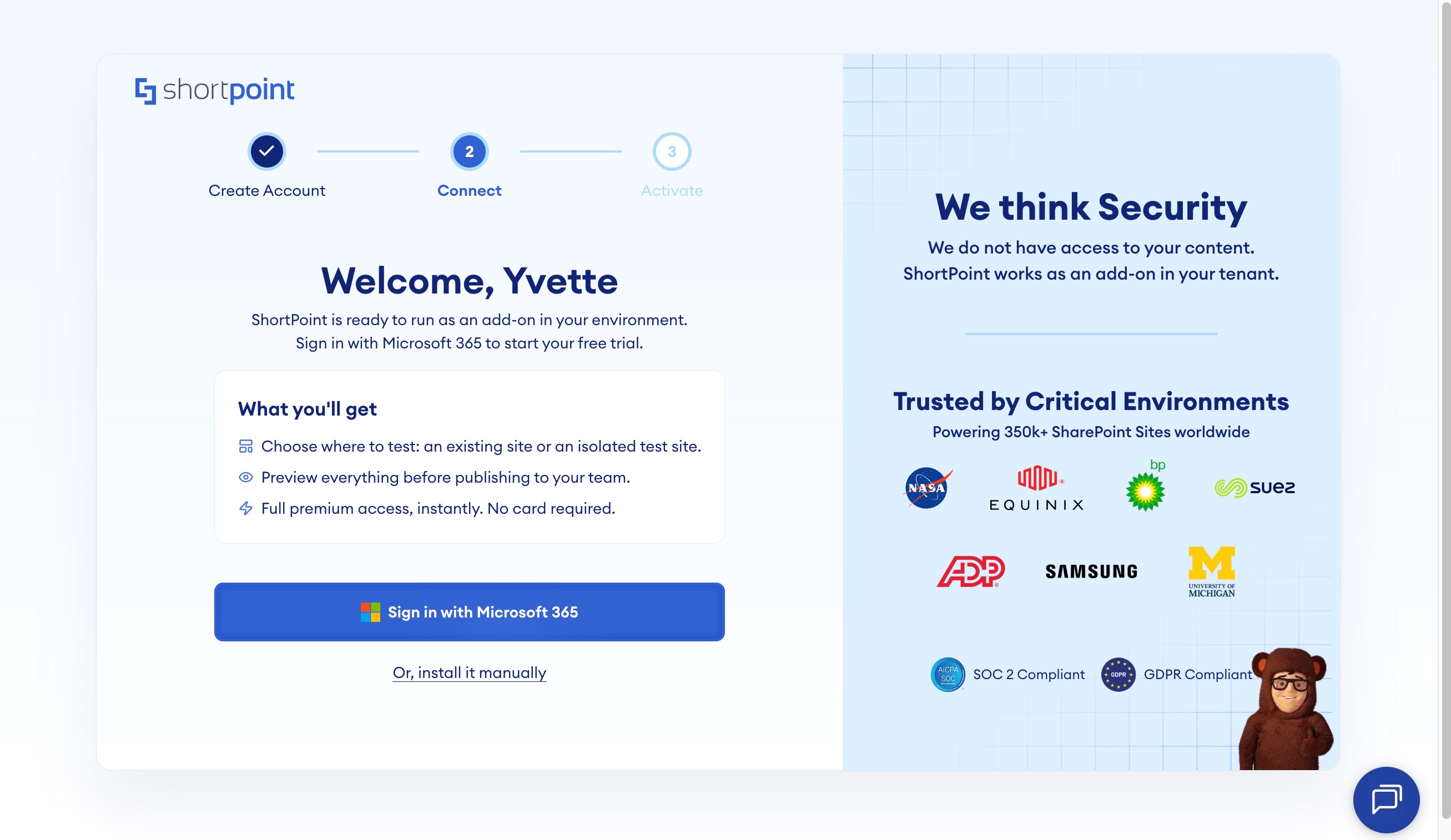
This is the fastest method, as ShortPoint’s automated installer handles the heavy lifting for you.
- Access the Installer: Open www.shortpoint.com/login in your web browser.
- Authenticate: Click the Sign in with Microsoft 365 button and enter your credentials.
- Target Your Site: Select the option to install ShortPoint on an Existing site and choose your preferred site from the list.
- Finalize: Accept the ShortPoint policies and conditions, then click Add ShortPoint.
The reinstallation process will begin automatically. Once finished, your ShortPoint version will be updated and will be CSP-compliant across all your SharePoint sites.
Option 2: Reinstall ShortPoint via Manual Installation
This method is ideal for administrators who prefer full control over their App Catalog. Following these steps ensures the new SPFx package is correctly deployed with Microsoft’s updated security protocols.
- Download the CSP-Compliant Package: Click the following link - ShortPoint CSP-Compliant SPFx Package. This will automatically download the latest version (.sppkg file) directly to your local machine.
- Access SharePoint App Catalog: Navigate to your SharePoint Admin Center. From the left-hand menu, select More features, then locate Apps and click Open. This will take you to your organization's Apps for SharePoint library.
Note:
This update requires the Modern App Catalog experience. If you are currently in the Classic view, please switch to the Modern experience before proceeding.
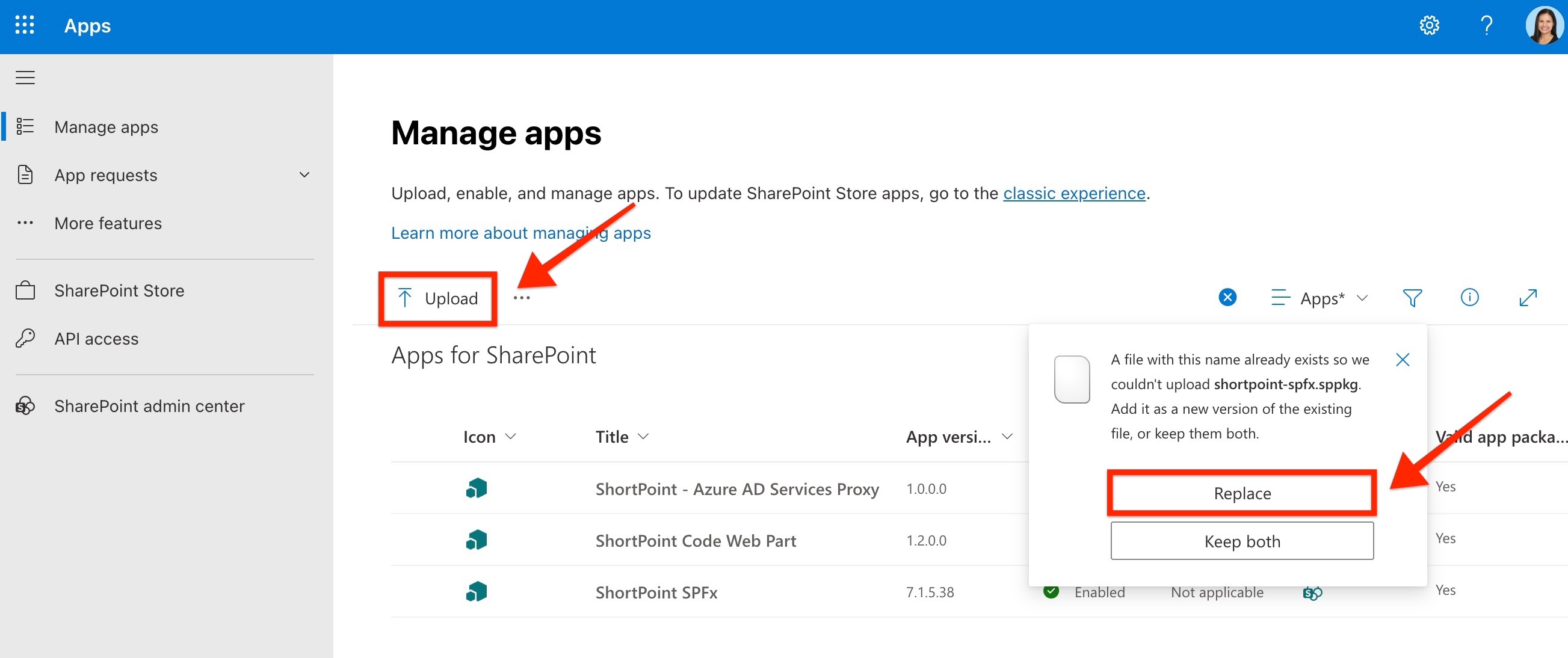
- Upload and Replace: Click Upload and select the newly downloaded ShortPoint .sppkg file from the file picker. When prompted by SharePoint that a file with the same name already exists, click Replace to update the old version with the new CSP-compliant version.
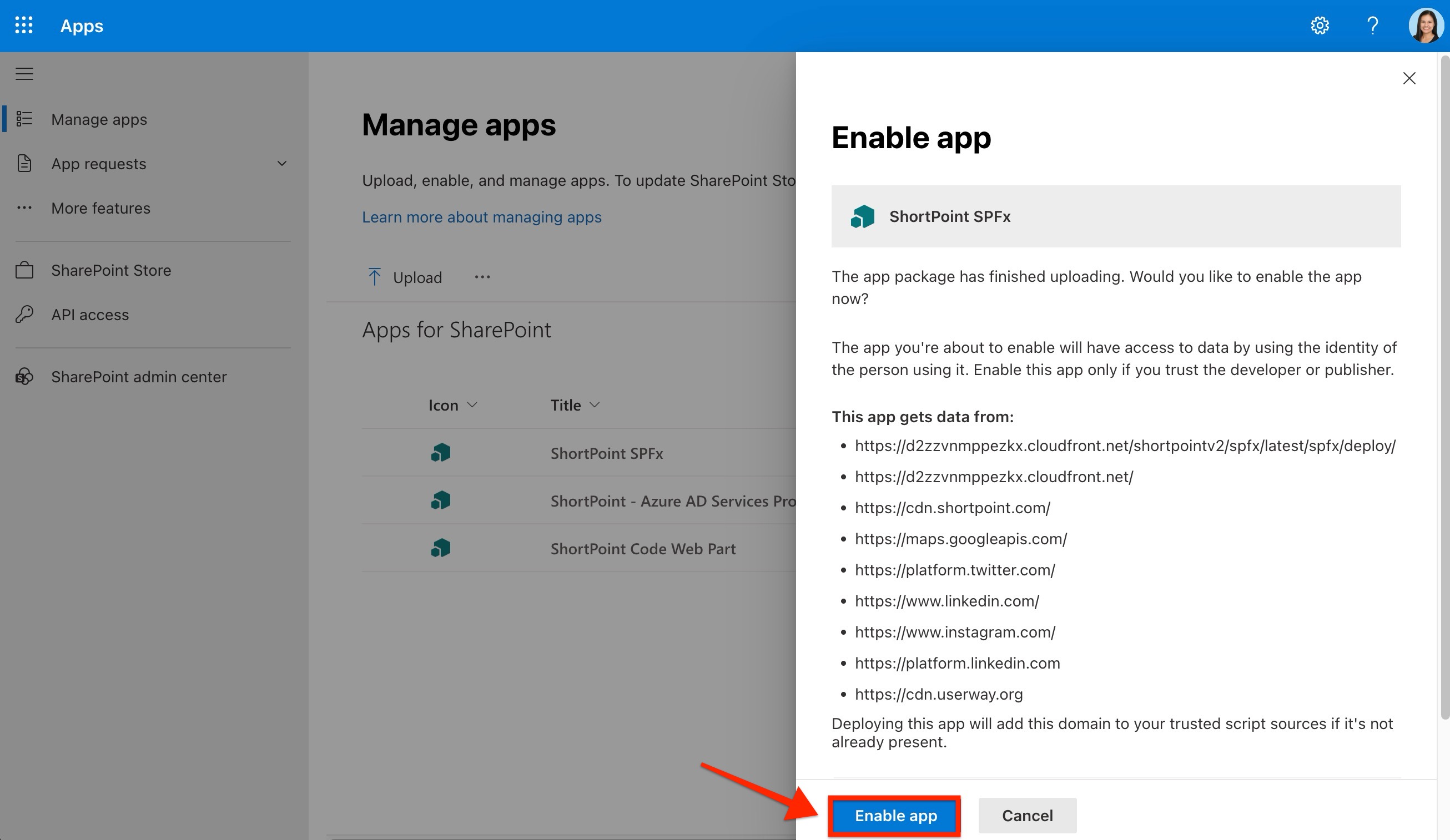
- Enable the App: A pop-up window will appear asking you to enable the ShortPoint solution.
- Review the list of Trusted Sources. This includes the necessary ShortPoint CDN URLs that will ensure the solution works as it should.
- Click Enable app.
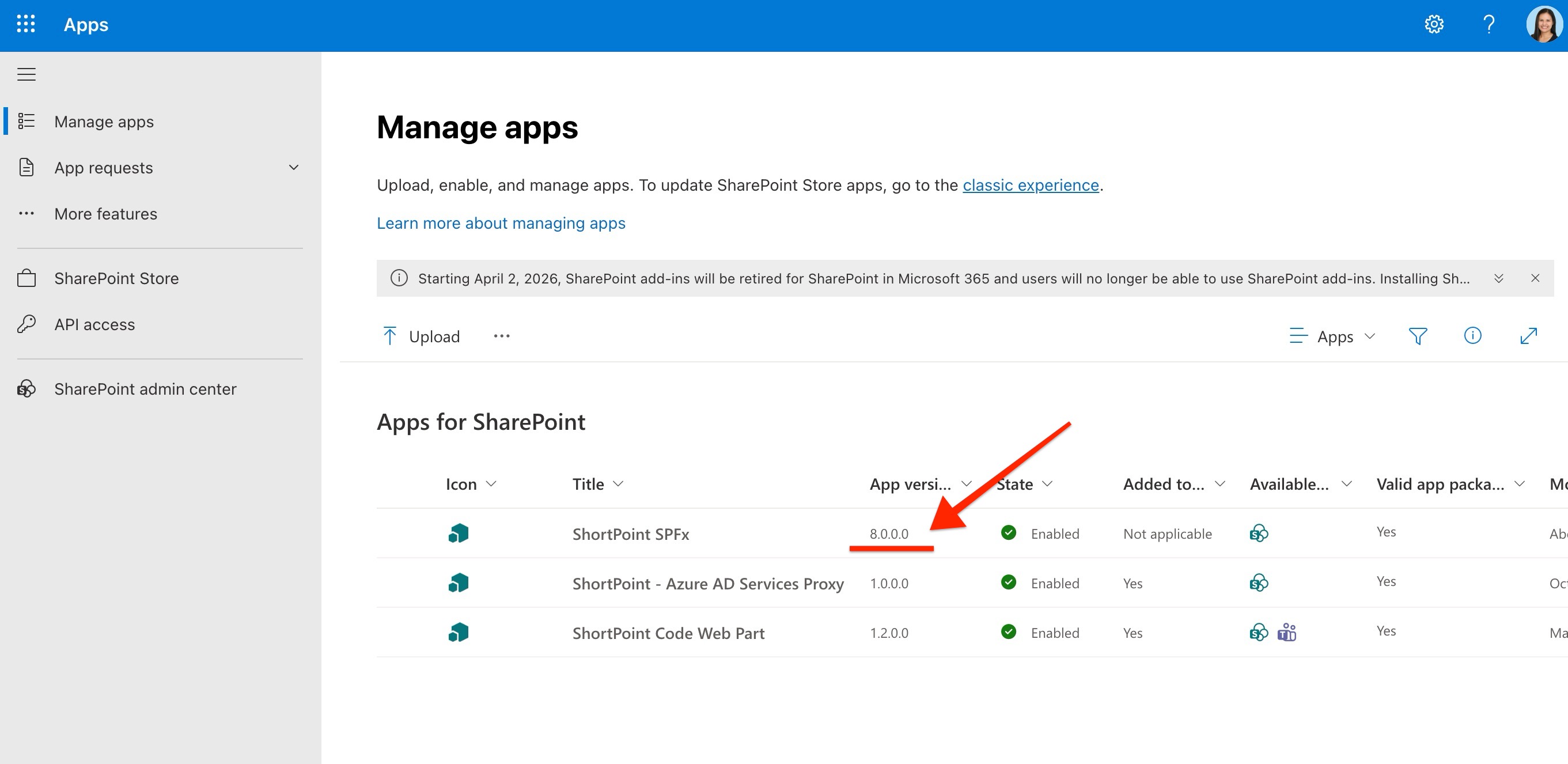
Once the status in the App Catalog shows as Enabled, the updated version is active across your tenant, and your sites are ready for the CSP enforcement.
Note:
Updated before February 24th: The SPFx package will still show as version 7.1.5.38 in your App Catalog. To confirm everything is set up correctly, go to SharePoint Admin Center > Advanced > Script Sources (Trusted Script Sources) and verify that the required ShortPoint domains are listed.
Updated on or after February 24th: The SPFx package will show as version 8.0.0.0 in your App Catalog.
Step 2: Update the ShortPoint Version to 8.7.6.0 or above
You'll also need to verify you're using the latest CSP-compliant release. Follow these steps:
- Access the ShortPoint Dashboard: Navigate to your SharePoint site, click the ShortPoint Shortcuts icon (top left), and select Dashboard.
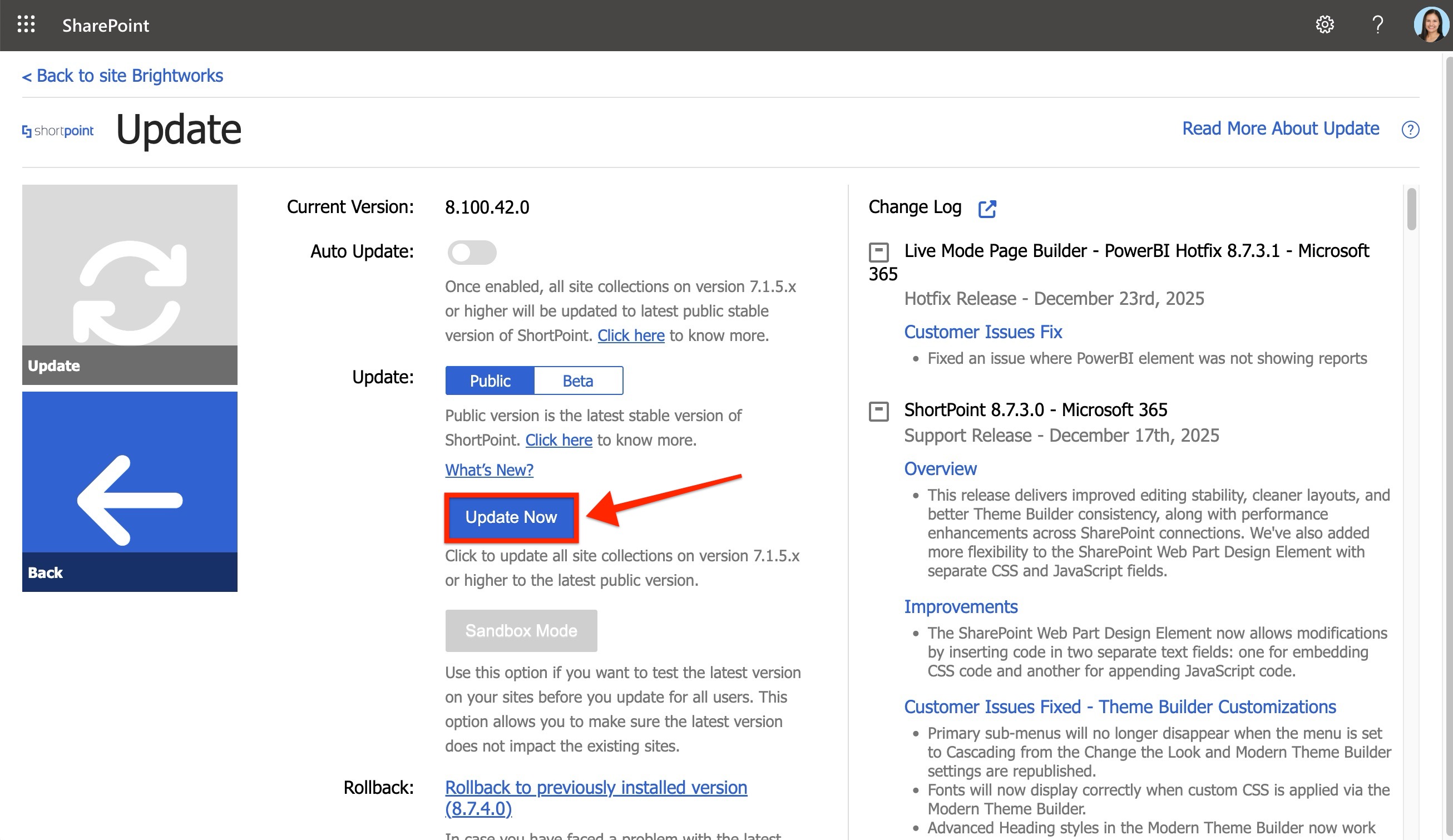
- Confirm Version Number: Look at the top-right corner or open the Update tile. Your environment is CSP-compliant if you are running ShortPoint version 8.7.6.0 or later.
- If the Auto-Upgrade toggle is turned on, you should already have the latest CSP-compliant version installed, and no further update action is required.
- If Auto-Upgrade is off, ensure you update to the CSP-compliant release by clicking the Update Now button.
What's Next? Test For Compatibility
Once you have completed the update, we highly recommend testing your most critical pages to see exactly how they will behave after CSP is fully enforced. This simple test allows you to see your site through the lens of Microsoft’s new security rules before they are permanently implemented.
How to perform the test
- Navigate to any important page on your intranet.
- Add
?csp=enforceto the very end of the URL in your browser’s address bar.
Example: .../SitePages/Home.aspx?csp=enforce
- Press Enter.
This parameter forces your browser to apply the strict CSP rules immediately. If your page loads and displays all elements correctly with this parameter active, you have successfully prepared your site for the Microsoft enforcement date.
If you encounter any issues or display errors while testing with the ?csp=enforce parameter, please report them to us immediately by submitting a ticket at support.shortpoint.com. By identifying these cases now, our team can work with you to resolve them well before the enforcement deadline, ensuring a flawless experience for your users on March 1st.
Need more time before you can update?
If you would like more time to coordinate this update with your organization’s scheduled maintenance or approval cycles, Microsoft has provided a temporary alternative. You have the option to postpone the full CSP enforcement for your SharePoint environment by 90 days, until June 1, 2026, using PowerShell. This allows you more time to resolve technical concerns without risking immediate design disruptions. We have a dedicated support article that provides the specific PowerShell commands and complete details on how to implement this for your environment.
Important:
This postponement option will be available in the SharePoint Online Management Shell starting February 9, 2026.
Frequently Asked Questions
Will my intranet site go down if I don’t update by March 1?
Your site will not crash, but functionality may stop rendering correctly once Microsoft enforces the new security policy. This could result in your pages looking "broken" or losing their customizations. Performing the update now ensures a seamless transition with zero downtime for your employees.
Which SharePoint versions are affected by the CSP enforcement?
This change specifically applies to SharePoint Online. Microsoft is tightening security enforcement for the cloud environment starting March 1, 2026, with a focus on standardizing how scripts are loaded and executed within the platform.
Does this update affect my existing ShortPoint designs or content?
No, this is a platform-level compatibility update. Your existing layouts, content, and configurations will remain exactly as you built them. The update simply ensures that the "handshake" between ShortPoint and SharePoint remains secure and authorized under the new Microsoft rules.
If I use the Automated Installation (Option 1), will it apply to all site collections?
Yes. Once you complete the automated installation process, the updated CSP-compliant package of ShortPoint is applied tenant-wide. All you need to do is ensure you are on the latest version of ShortPoint (version 8.7.6.0 on your ShortPoint Dashboard) and you are done. You do not need to repeat these steps for every individual site collection; the update ensures that all sites across your SharePoint environment are ready for the new security enforcement.
Is the cloudfront.net URL safe to add as a Trusted Script Source?
Yes. The URL https://d2zzvnmppezkx.cloudfront.net/ is the official Amazon CloudFront Content Delivery Network (CDN) used by ShortPoint to deliver the scripts and design assets that make your intranet look great. Adding it to your trusted list simply tells SharePoint that you authorize this specific source to run on your pages.
What happens if I postpone the enforcement via PowerShell?
Postponing gives you a temporary extension beyond the March 1 deadline. It is a great "safety net" if you need more time for internal testing or administrative approvals. However, keep in mind that this is a temporary measure; we highly recommend completing the ShortPoint update as soon as possible to maintain a modern security posture.
Related articles:
- Content Security Policy (CSP) in SharePoint Online: What It Is and Why It Matters
- Managing Trusted Script Sources for JavaScript Customizations in ShortPoint
- How to Postpone SharePoint Content Security Policy (CSP) Enforcement Using Powershell
