 Try ShortPoint now
The AI Designer was built to respect your tenant boundaries, comply with international data regulations, and keep your organizational data secure. This reflects our ongoing commitment to protecting your data and privacy.
In this guide, we explain how the AI Designer interacts with your SharePoint environment, what data is processed during generation, how we protect it in transit and at rest, and how administrators can control retention to match internal security policies.
NOTE: ShortPoint AI Designer does not access, store, or train on the content of your SharePoint sites, document libraries, or list items. References to "data" in this article refer only to the prompt text, AI-generated replies, and basic operational metadata processed to deliver the AI Designer feature.
TABLE OF CONTENTS
- Prerequisites
- Zero Direct Access to SharePoint Data
- What Data Is Processed (and What Is Ignored)
- Encryption and Transit
- You're In Control: Storage and Retention Settings
- LLM Provider Infrastructure and Compliance
- Grounded In ShortPoint's Global Security Standards
- Our Commitment to You
- Frequently Asked Questions
Prerequisites
- You must have ShortPoint version 9.0.0.1 or later installed on your SharePoint environment.
- You must have the AI Designer enabled on your SharePoint environment.
- To adjust the AI Designer Data Collection settings, you must have access to the ShortPoint Dashboard as a ShortPoint Admin with an active Pro or Enterprise License.
Zero Direct Access to SharePoint Data
Here's the most important thing to know: our AI backend doesn't have direct access to your SharePoint data, user credentials, or Microsoft Graph API tokens. The AI can't autonomously browse your SharePoint sites, crawl your indices, or pull data from unrelated places. Our backend never connects directly to any *.sharepoint.com or graph.microsoft.com endpoint.
So, how does it work when you ask the AI to do something that needs SharePoint context, like listing your available document libraries before setting up a connection? The AI backend pauses and securely asks your browser to make the call. Your browser, already authenticated through your active Microsoft session, fetches the information and passes it back to the AI Designer.
This means every SharePoint data retrieval happens within the boundaries of your existing permissions. The AI never sees more than you can see.
What Data Is Processed (and What Is Ignored)
When you submit a prompt in the AI Designer, here's what actually gets transmitted:
- The text prompt you entered
- The AI's generated response (which includes ShortPoint shortcode)
- Basic metadata: tenant domain, page URL, timestamps, and token counts (used for billing and analytics)
If your browser fetches SharePoint or Graph API data partway through generation (as explained above), that data passes through our systems just long enough to generate the right configuration. It lives in memory only, and we drop it the moment the response goes back to you. No SharePoint list items, document content, or user profile data ever lands in our long-term storage.
Encryption and Transit
To satisfy enterprise corporate security requirements, data protection is enforced at every stage of transmission and storage:
- Encryption in Transit: All communications between your browser, the ShortPoint core servers, and the underlying AI infrastructure are forced over HTTPS and encrypted using TLS 1.2 or higher protocols.
- Encryption at Rest: Regardless of your chosen retention settings, all sensitive database tables are protected using per-tenant envelope encryption via AES-256-GCM standards, keeping your data structurally isolated and secure.
- Third-Party Access: No external third parties have access to your data streams. The data flow is restricted strictly to ShortPoint's secure infrastructure and our designated enterprise infrastructure sub-processor.
You're In Control: Storage and Retention Settings
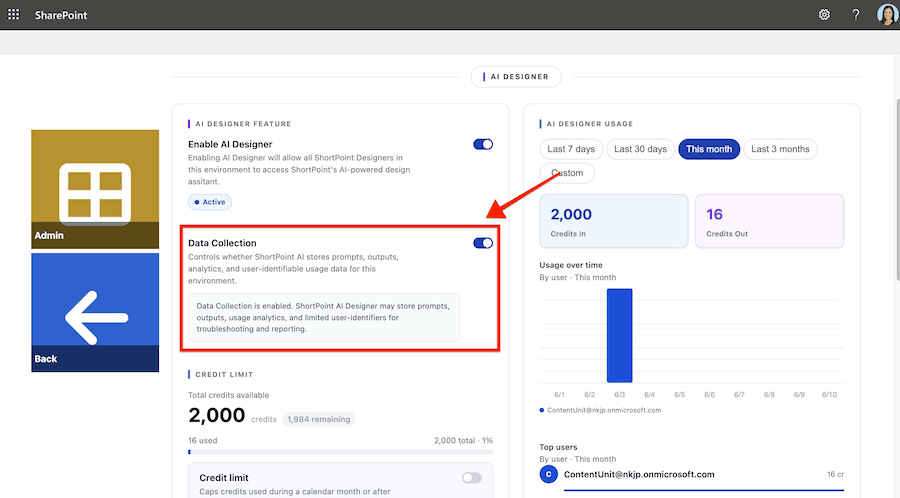
Whether we retain the text of your prompts and the AI's replies is entirely your call. ShortPoint Admins can manage this with a per-tenant Data Collection toggle in the ShortPoint Dashboard.
- Data Collection ON (Default): We store the prompt text, the AI's generated reply, tool-call inputs and results, and metadata. This powers the conversation history feature in the AI Designer, so users can revisit past designs. It also helps our support team troubleshoot generation issues if you ask for help.
- Data Collection OFF: The content fields in our database stay empty. We drop all prompt text, AI replies, tool-call data, and telemetry traces. We only keep the structural message rows and metadata (like token counts) needed for billing. Conversation history won't be saved.
Whichever setting you choose, all sensitive database columns are protected with per-tenant envelope encryption (AES-256-GCM) — a strong, modern encryption standard that keeps your data isolated at rest.
LLM Provider Infrastructure and Compliance
For your compliance teams running Data Protection Impact Assessments (DPIAs) or maintaining vendor registers, here's how the AI Designer is built behind the scenes:
- Model Registry and Engines: The AI Designer runs on enterprise-tier Gemini 3 Flash, Gemini 3.1 Pro, Gemini 3.1 Flash Lite models, hosted within Google Cloud Platform’s (GCP) enterprise AI infrastructure.
- Zero Model Training Policy: Your prompts and generated designs are confidential. Neither ShortPoint nor Google uses your inputs or outputs to train foundational AI models.
- Paid Tier and Legal Compliance: All Gemini API calls run through an active, paid Google Cloud commercial account framework (Tier 3). This meets the legal requirements set out in Google's Terms of Service for serving users in the EU, UK, and North American regions.
- No External Web Search Grounding: We don't use the "Grounding with Google Search" feature in any of our models. Because web search grounding is disabled, your prompt data isn't subject to Google's secondary 30-day search data retention clause.
For your internal inventory and compliance records, here are the official project details:
| Detail | Value |
|---|---|
| Enterprise Cloud Provider | Google Cloud Platform (GCP) |
| Official GCP Project Name | ShortPoint AI Gen |
| Official GCP Project ID | shortpoint-ai-gen |
| Core Models Deployed | Gemini 3 Flash, Gemini 3.1 Pro, Gemini 3.1 Flash Lite (Enterprise Edition) |
Grounded In ShortPoint's Global Security Standards
The security infrastructure behind the AI Designer isn't a separate set of rules. It's an extension of the standards we apply across the entire ShortPoint platform. The same encryption practices, access controls, and audit procedures that protect the rest of our services protect the AI Designer, too.
If you'd like to dig deeper into our broader security posture, visit the ShortPoint Trust Center.
Our Commitment to You
Privacy by design isn't just something we say. It's how we built the AI Designer. Your prompts stay confidential, your SharePoint content never leaves your environment, and you decide what we keep.
If you have questions about how the AI Designer handles your data, or you'd like to walk your InfoSec team through the architecture in more detail, reach out to us at privacy@shortpoint.com. We're happy to help.
Frequently Asked Questions
Does ShortPoint AI Designer store or train on my SharePoint content?
No. ShortPoint AI Designer does not access, store, or train on the content of your SharePoint sites, document libraries, or list items. The AI backend has no direct connection to *.sharepoint.com or graph.microsoft.com endpoints. When SharePoint context is needed (for example, to list available document libraries), your authenticated browser fetches that data and passes it to the AI Designer, so every retrieval respects your existing permissions. Neither ShortPoint nor Google uses your prompts or generated designs to train foundational AI models.
Which LLM does ShortPoint AI Designer use, and where is it hosted?
ShortPoint AI Designer runs on enterprise-tier Gemini 3 Flash, Gemini 3.1 Pro, Gemini 3.1 Flash Lite models, hosted within Google Cloud Platform’s (GCP) enterprise AI infrastructure. All API calls route through an active, paid Google Cloud commercial account framework (Tier 3), which satisfies Google's Terms of Service requirements for serving users in the EU, UK, North American regions. The "Grounding with Google Search" feature is disabled, so your prompt data isn't subject to Google's 30-day search data retention clause.
Can I stop ShortPoint from storing my AI Designer prompts?
Yes. Administrators can switch off prompt retention using the per-tenant Data Collection toggle in the ShortPoint Dashboard. When Data Collection is OFF, ShortPoint drops all prompt text, AI replies, tool-call data, and telemetry traces — only structural message rows and metadata (like token counts) needed for billing are kept. Conversation history won't be saved. You need ShortPoint Admin access with a Pro or Enterprise License to change this setting.
